Container runtime
The Technitium image runs as the dns-server container with an unless-stopped restart policy and bridge networking. Docker publishes DNS on both TCP and UDP port 53.
LAB / 01 · DNS infrastructure
Technitium DNS runs in Docker on an Ubuntu homeserver. The router advertises the server as the primary DNS resolver for LAN clients, while the same service is reachable over the private Tailscale network. The evidence below shows the runtime configuration and successful client-side validation.
01 / Architecture
The design keeps the DNS service on the homeserver and exposes it through the interfaces already used by local and private-network clients.
02 / Implementation
The useful proof is not the admin interface. It is the combination of runtime configuration, network distribution and independent DNS responses.
The Technitium image runs as the dns-server container with an unless-stopped restart policy and bridge networking. Docker publishes DNS on both TCP and UDP port 53.
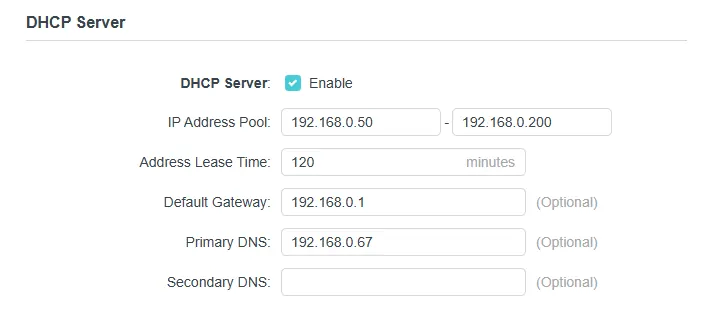
The router DHCP service advertises 192.168.0.67 as the primary DNS resolver, so ordinary DHCP clients are directed to the homeserver by default.
The homeserver is reachable at 100.89.254.66 on Tailscale. A separate Linux game-server node successfully queried that address directly on port 53.
Technitium query logs show successful requests from a LAN client with RCODE: NoError, while the remote dig test returned valid Google A records and status: NOERROR.
03 / Evidence
The page shows readable extracts first. Each card also links to the original evidence screenshot at full size, so the complete source remains available without shrinking it into an unreadable thumbnail.
david@homeserver:~$ docker inspect dns-server --format ...
Container: /dns-server
Image: technitium/dns-server:latest
Status: running
Restart policy: unless-stopped
Network mode: bridge

david@homeserver:~$ docker port dns-server | grep -E '^53/(tcp|udp)'
53/tcp -> 0.0.0.0:53
53/tcp -> [::]:53
53/udp -> 0.0.0.0:53
53/udp -> [::]:53
 Open full screenshot ↗
192.168.0.67 as the primary resolver.2026-09-08 00:13:51 UTC 192.168.0.117 UDP epdg.epc.mnc030.mcc234.pub.3gppnetwork.org A NoError 2026-09-08 00:33:51 UTC 192.168.0.117 UDP epdg.epc.mnc030.mcc234.pub.3gppnetwork.org A NoError 2026-09-08 00:39:24 UTC 192.168.0.117 UDP euw1-app-server.iot.i.tplinkcloud.com AAAA NoError 2026-09-08 00:39:24 UTC 192.168.0.117 UDP euw1-app-server.iot.i.tplinkcloud.com A NoError 2026-09-08 00:39:25 UTC 192.168.0.117 UDP n-euw1-wap.i.tplinkcloud.com AAAA NoError 2026-09-08 00:39:25 UTC 192.168.0.117 UDP mtalk.google.com A NoError
192.168.0.117 resolving multiple domains over UDP with NoError.Open original screenshot ↗david@homeserver:~$ tailscale ip -4 100.89.254.66 david@homeserver:~$ tailscale status | head -1 100.89.254.66 homeserver
100.89.254.66.Open original screenshot ↗server-admin@server-admin-System-Version:~$ dig @100.89.254.66 google.com A
;; ->>HEADER<<- opcode: QUERY, status: NOERROR
;; QUESTION SECTION:
;google.com. IN A
;; ANSWER SECTION:
google.com. 64 IN A 142.250.117.101
google.com. 64 IN A 142.250.117.102
google.com. 64 IN A 142.250.117.100
;; Query time: 10 msec
;; SERVER: 100.89.254.66#53(100.89.254.66) (UDP)
100.89.254.66:53; dig returns NOERROR and valid A records.Open original screenshot ↗04 / What this proves
This evidence supports the claim that I deployed and operated a containerised Technitium DNS service, distributed it to LAN clients through DHCP and validated direct DNS resolution over Tailscale from another node.
It does not claim that every application on every device is forced to use Technitium. VPN clients, encrypted DNS and manual resolver settings can override DHCP or operating-system defaults.
Privacy note: full query histories and unrelated Tailscale peer details are not published. Original screenshots linked above contain only the evidence retained for this case study.